How to Create a WAX Cloud Wallet in 2026 (And Bypass the 5 WAX Activation Fee)
TL;DR: The default WAX MyCloudWallet requires a 5 WAX fee sent to create.wax for activation. You can bypass the 5 WAX activation fee for free by registering for Neuroborn Cats and submitting your wallet memo code in the community Discord. The developers will fund the activation transaction on your behalf.
If you are exploring the WAX blockchain in 2026, setting up a wallet is your first mandatory step. However, what starts as a simple registration process quickly turns into a frustrating roadblock for many beginners: the dreaded activation fee.
In this guide, we will walk you through the exact steps to create your account and show you exactly how to bypass the 5 WAX activation fee entirely so you can start exploring without buying crypto upfront.
Anchor vs. MyCloudWallet: Which Should You Choose?
Currently, there are two main wallets actively used on the WAX blockchain: Anchor and MyCloudWallet (formerly CloudWallet).
If you are a beginner, MyCloudWallet is the default choice. Anchor is a fantastic non-custodial wallet for experienced power users, but its technical setup is often overwhelming for newcomers. MyCloudWallet is custodial, actively promoted by the blockchain, and integrates seamlessly with almost every decentralized app (dApp) and game on the network.
Step-by-Step Guide to Registering Your WAX Wallet
Starting the registration process is straightforward. Here is what you need to do:
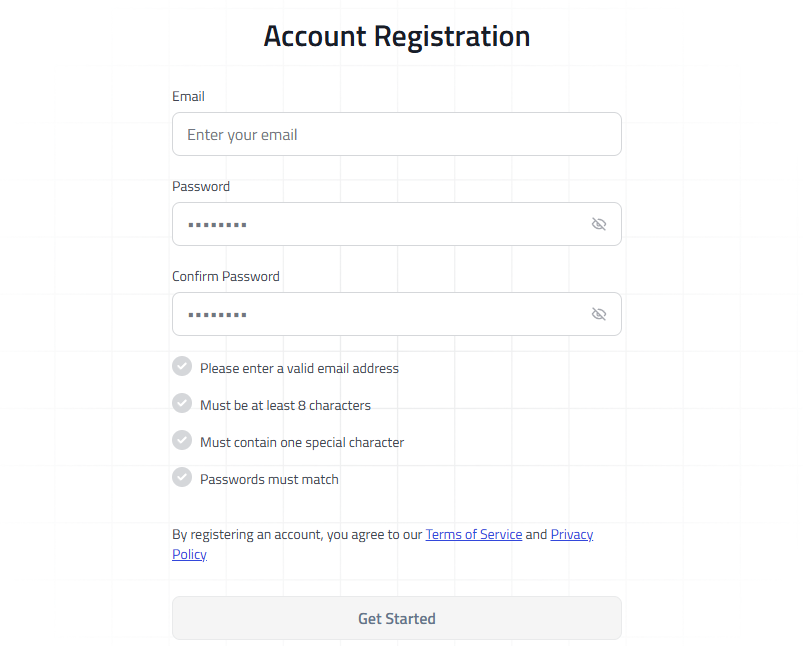
- Visit the official portal: Go to the official MyCloudWallet website and click "Sign Up."
- Enter your details: Provide a valid email address and create a strong, secure password.
- Verify your email: Check your inbox for the confirmation code and enter it on the registration screen.
- Secure your seed phrase: You will be given a 12-word recovery phrase. Write this down on physical paper and store it safely. If you lose your password, this is the only way to recover your account.
The Catch-22: How to Pay 5 WAX to create.wax
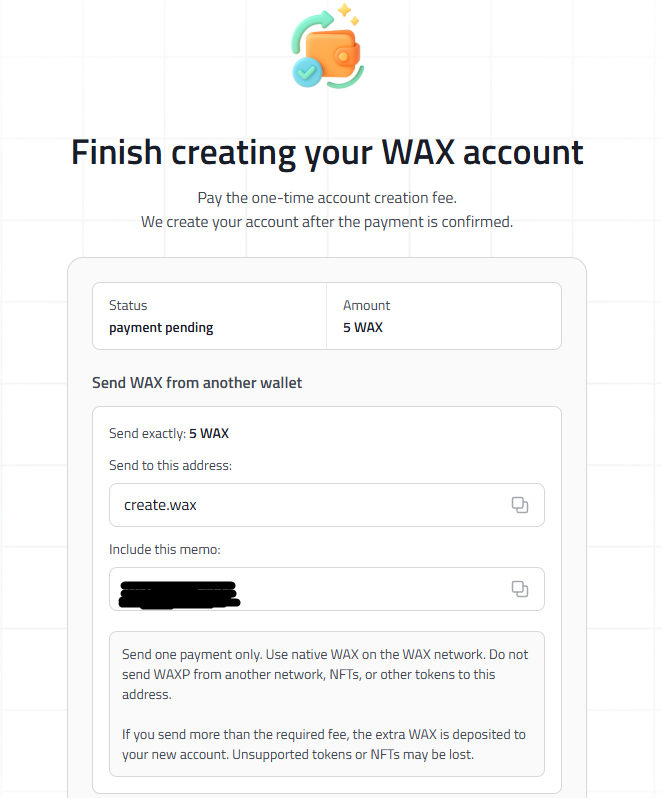
After safely storing your seed phrase, you will hit the final screen. To finalize the creation of your account, the system requires you to send 5 WAX to the address create.wax, including a unique activation code in the transaction memo.
This is where most new users get stuck.
The major flaw in this system is that you must send these 5 WAX from an already active wallet. If you do not have another crypto wallet, and you do not have a friend already on the WAX blockchain who can pay it for you, you are essentially locked out. You cannot activate a WAX wallet without crypto, but you need the wallet to hold the crypto.
How to Get Your Free WAX Wallet Activation
We know this onboarding process is incredibly frustrating. As the developers behind Neuroborn Cats—a browser-based MMORPG set in a unique alternative cat-cyberpunk universe—we believe entering the WAX ecosystem should be seamless.
To help new users overcome this hurdle, Neuroborn Cats provides a free WAX wallet activation service. We will pay the 5 WAX activation fee for you so you can step right into our world.

Here is how to get your wallet activated for free:
- Register for the game: Create a quick account on our official portal at game.neuroborncats.com.
- Join our community: Hop into our official Discord server.
- Drop your code: Navigate to the dedicated
#WAX-wallet-activationchannel. Post your Gatian in-game nickname along with the unique memo code the WAX registration screen gave you. - Wait for activation: Our team will send the 5 WAX from our server wallet to
create.waxusing your memo. Within a few minutes, your new MyCloudWallet will be fully active!
Frequently Asked Questions
How do I bypass the 5 WAX activation fee for MyCloudWallet?
You can bypass the 5 WAX activation fee by joining the official Discord server for Neuroborn Cats. The developers provide a free service where they will pay the 5 WAX fee to the create.wax address on your behalf if you provide your new wallet memo code and in-game nickname.
Can I activate a WAX Cloud Wallet without buying crypto?
Yes. While the official process requires 5 WAX, you can use community services like the one provided by Neuroborn Cats to have the activation fee paid for you without needing to purchase cryptocurrency on an exchange.
What does "send 5 WAX to create.wax" mean?
It is the final security and anti-spam measure for creating a new custodial WAX wallet. It requires another active account on the blockchain to send 5 tokens to a central smart contract (create.wax) with your specific memo code to mint your new account.